

OPC UA Client
Dieser Inhalt ist noch nicht in deiner Sprache verfügbar.
logiccloud Control runtimes can act both as an OPC UA Client and Server. If you want to use logiccloud Control as OPC UA Client, add a new OPC UA Client connection.
Setting up the client connection
Section titled “Setting up the client connection”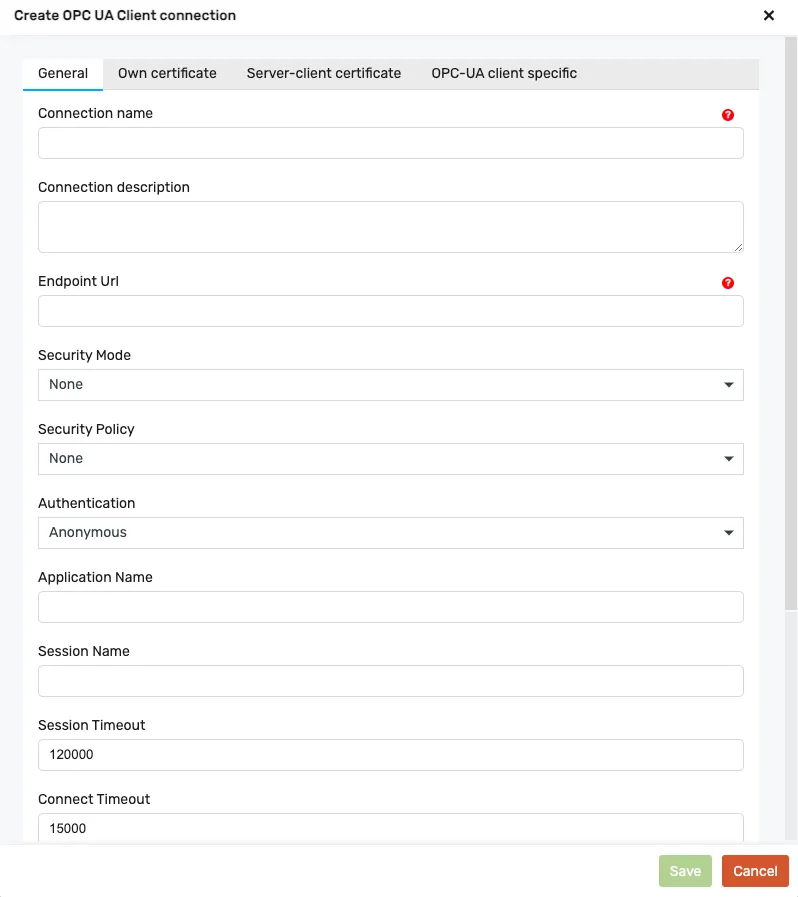
General Connection settings
Section titled “General Connection settings”Connection name: name of the connectionConnection description: description, optionalEndpoint URL: URL of the server URLSecurity Mode: security mode used for messages; it can be one of the following: “None”, “Sign”, “SignAndEncrypt”,Security Policy: encryption used for messages; it can be one of the following: “None”, “Basic128Rsa15”, “Basic256”, “Basic256Sha256”, “Aes128Sha256RsaOaep”, “Aes256Sha256RsaPss”.Authentication: mode to authenticate to an OPC UA Server: “Anonymous”, “Credentials”, “Certificate”, “Token”.Application Name: the name of the client application (if empty, package name will be used for it)Session Name: the name of the session (if empty, server will assign a name for it)Session Timeout: the number of milliseconds that a session may be unused before being closed by the serverConnect Timeout: the number of milliseconds to wait for a connection responseRequest Timeout: the number of milliseconds to wait before a ServiceRequest (i.e. Write, Publish, etc…) is cancelledToken lifetime: the requested number of milliseconds before a security token is renewedSkip server cert check: skips verification of server certificate. Skips checking HostName, Expiration, and Authority.Write Retry Interval: the number of milliseconds to wait before a write failed operation is retried.
Own Certificate settings
Section titled “Own Certificate settings”Auto generate own certificates: If enabled, own certificate will be created automaticallyValid Months: Validity timeframe for own certificateKey size: Certificate key sizeOwn Certificate path: Path, where own certificate is storedOwn Key path: Path, where own certificate key is stored
Server-client certificate settings
Section titled “Server-client certificate settings”Issuer Certificates Path: the file path of the issuer certificates. Issuer certificates are needed for validation, but are not trusted. Path may be to a file, comma-separated list of files, or directory.Issuer CRLs Paths: the file path of the issuer revocation lists. Issuer certificates are needed for validation, but are not trusted. Path may be to a file, comma-separated list of files, or directory.Trusted Certificates Paths: the file path of the trusted certificates. Path may be to a file, comma-separated list of files, or directory.Trusted CRLs Paths: the file path of the trusted revocation lists. Path may be to a file, comma-separated list of files, or directory.Rejected Certificates Path: the file path where rejected certificates are stored. Path must be to a directory.
Client-specific settings
Section titled “Client-specific settings”Trace requests responses: logs all low-level ServiceRequests and ServiceResponses to StdOutMax Buffer size: is the limit on the size of the send and receive buffers.Max message size: is the limit on the size of messages that may be accepted.Max chunk count: is the limit on the number of message chunks that may be accepted.
After adding the connection, proceed with adding a Subscription.
Creating a subscription
Section titled “Creating a subscription”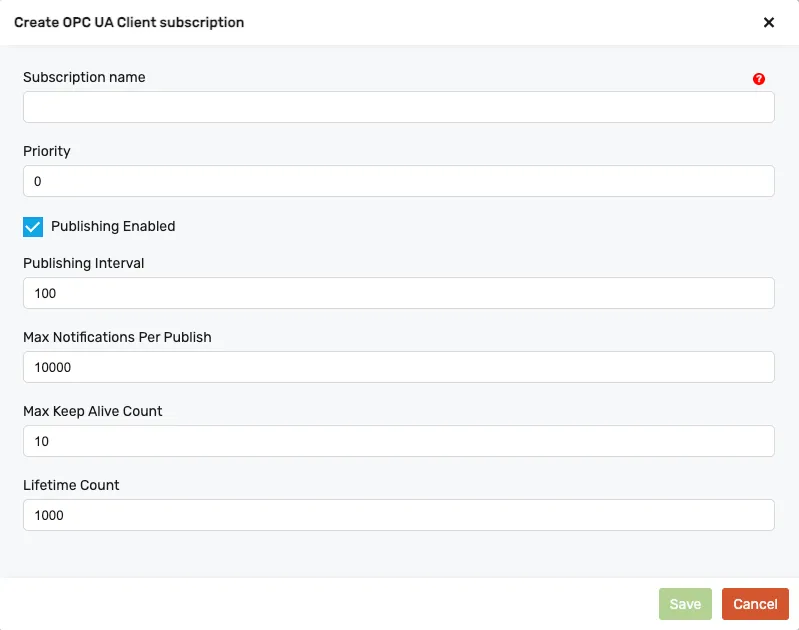
Subscription settings
Section titled “Subscription settings”Subscription name: name of the subscription (the subscription contains a list of monitored items for which we will receive updates from the server)Priority: Indicates the relative priority of the Subscription. When more than one Subscription needs to send a Publish response, the Server should de-queue a Publish request to the Subscription with the highest priority number. For Subscriptions with equal priority the Server should de-queue Publish requests in a round-robin fashion. A Client that does not require special priority settings should set this value to zero.Publishing interval: This interval defines the cyclic rate that the Subscription is being requested to return Notifications to the Client. This interval is expressed in milliseconds. If the requested value is 0 or negative, the Server will revise it with the fastest supported publishing interval.Max notifications per publish: The maximum number of notifications that the Client wishes to receive in a single Publish response. A value of zero indicates that there is no limit.Max keep alive count: maximum keep-alive count. When the publishing timer has expired this number of times without requiring any NotificationMessage to be sent, the Subscription sends a keep-alive Message to the Client. If the requested value is 0, the Server will revise it with the smallest supported keep-alive count.Lifetime count: Requested lifetime count. The lifetime count shall be a minimum of three times the keep-alive count. When the publishing timer has expired this number of times without a Publish request being available to send a NotificationMessage, then the Subscription will be deleted by the Server.
Mapping process variables
Section titled “Mapping process variables”After adding a subscription, you can map process variables.
Variable name: Chose a variable from your POUsTag browser name: non-localized human-readable name of a node when browsing the address space of the serverTag display name: localized human-readable name of a node when browsing the address space of the serverData Type: Data type of the variableMonitoring Mode: The monitoring mode to be set for the MonitoredItem. It can be one of the following: DISABLED (0) = The item being monitored is not sampled or evaluated, and Notifications are not generated or queued. Notification reporting is disabled. SAMPLING (1) = The item being monitored is sampled and evaluated, and Notifications are generated and queued. Notification reporting is disabled. REPORTING (2) = The item being monitored is sampled and evaluated, and Notifications are generated and queued. Notification reporting is enabled.Node Id: unambiguously identifies a node inside the address space of the server.Queue Size: The requested size of the MonitoredItem queue.Sampling interval: The interval that defines the fastest rate at which the MonitoredItem(s) should be accessed and evaluated. This interval is defined in milliseconds. The value 0 indicates that the Server should use the fastest practical rate. The value -1 indicates that the default sampling interval defined by the publishing interval of the Subscription is requested. A different sampling interval is used if the publishing interval is not a supported sampling interval. Any negative number is interpreted as -1.Discard oldest: Specifies the discard policy when the queue is full and a new Notification is to be queued. It has the following values: true = the oldest (first) Notification in the queue is discarded. The new Notification is added to the end of the queue. false = the last Notification added to the queue gets replaced with the new Notification.